I had brain child yesterday while listening to "The New Tech Tv" Podcast Ep. 5
Why not get a Lapdeck for cheap, and plug a raspberry pi into it? I was working up how I could use that Matt had done and change it for the Pi. Then after thinking about it for about 2 and a half hours, which I was then off of work, decided to look up to see if the mod had been done for it yet. Sure enough, my brain child had been done already. BUT, where I see to improve on it, is get the pi to the point where it can log into a VM and run windows using the Pi-lapdeck as a terminal, with a minimalistic Linux installed.
So, since I have 2 pies, I bought 2 of the lapdecks at $50, and as soon as they get here, my the hacks begin!
More to come, and there is still a huge project I am working on, have been working on since before DEFCON 20. I have to finish getting it up and running and documentation for, then I will post it.

Showing posts with label pwn pi. Show all posts
Showing posts with label pwn pi. Show all posts
Friday, October 5, 2012
Saturday, September 29, 2012
Long Time No Post.
I have been pulling crazy hours at my day job and haven't posted in a while. Lots of over time which means a bigger paycheck, but that's as long as you can keep the wife happy during that time.
So for my updates:
Bricked my Wifi Pineapple Mark 4, just got the cable this week and re-flashed from serial.
I bought this USB 2.0 to TTL UART 6PIN Module Serial Converter http://www.amazon.com/gp/product/B006JKNWLE/ref=oh_details_o00_s00_i00
Bought the NEW alfa card AWUS036NHR in a kit I got from Amazon.
High-Gain 2000mw 2W 802.11 B/G/N Wireless
So far I really like it and it suits my needs wonderfully.
Here is the link http://www.amazon.com/Alfa-AWUS036NHR-High-Gain-Wireless-N-Strongest/dp/B005F0BP1I/ref=sr_1_3?ie=UTF8&qid=1348986902&sr=8-3&keywords=AWUS036NHR
I received my Raspberry Pi micro SD card to SD half cards from Kickstarter.
Here is the link to show what it is and how to get one. http://www.quilix.com/pio
I also grabbed a couple of NFC tags to start playing with.
I also have another idea for hiding the raspberry pi, but i want to show pictures of it once it's done.

Saturday, August 25, 2012
Hide-a-PwnPi
There are times you want to go to the library, or community college, and want to to see whats going on the network, or use their pipes. Below are a few Pictures of a quick case I made to hide such things from plan site.


Monday, August 20, 2012
Pwn Pi Pics
This is my set up

On my computer

it just says settings

like below

And it has a purple terminal background.

Using my nexus 7, ssh into it and start vnc view at 1024x600


And you can see the menu!


Monday, July 16, 2012
Raspberry Pi update
I bought 2 Raspberry Pi's, and I'll document here, what I did with both.
I am doing this on a Windows 8 Release Preview 32 bit, build 8400, AMD Athlon 7550 Dual-Core 2.50 GHz, 4 GB Ram.
First I went to Raspberry Pi's Official Site, under the download page and Downloaded the OS's I wanted.
Then I downloaded Win32DiskImager , then un-ziped it.
Very Important, I right clicked Win32 Disk Imager, and ran as administrator.

I clicked on the Blue Folder Icon, then browsed to my un-ziped OS, in this example its archlinuxarm-13-06-2010.img
I select the drive letter of the SD card in the device box. Make sure to select the correct drive; if you get the wrong one you can destroy your computer's hard disk!
I click Write and waited for the write to complete.
After that, I exit the imager and ejected the SD card.
Plugged the card in the Raspberry Pi, power it on, and it booted up.

The First OS I put on was Pwn Pi.
It's a security suite for the Raspberry Pi.
Default Login username is root and password root.

The picture above is what the desktop looks like.
After that I switched to my second Pi and plugged in the Debian "squeeze" OS.

And plugged it into my 55 inch projection tv via the RCA jack, and it looks great!
So below I wanted to test my Discovery projector with the Raspberry Pi.
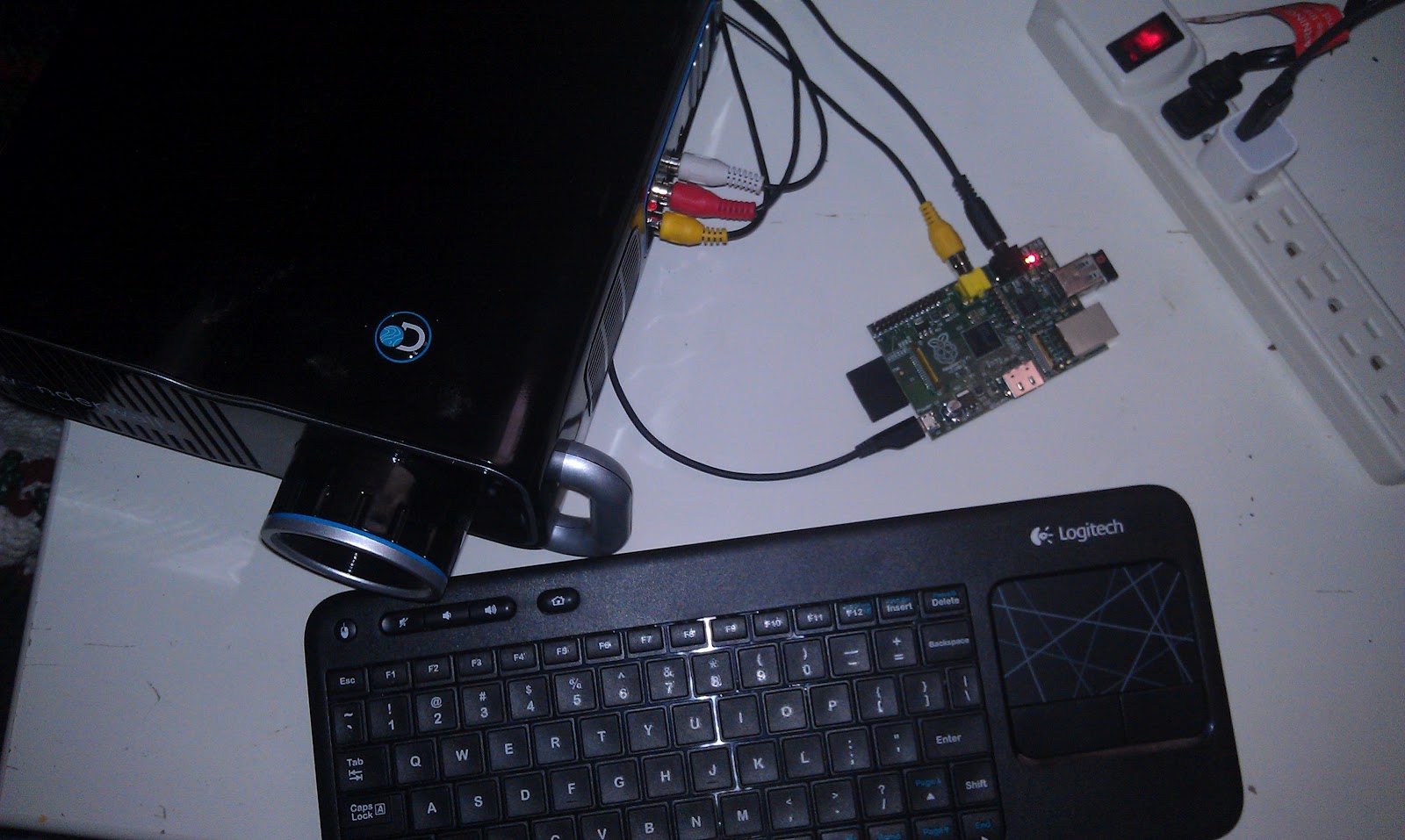
Via element14.com for $35
Via woot.com when it was on sale for $35
Via local Wal-mart for $30
Via icemonkey.com when it was on sake for $4.99
That's it for tonight, have a good one, and I'll be posting more soon!
Subscribe to:
Posts (Atom)